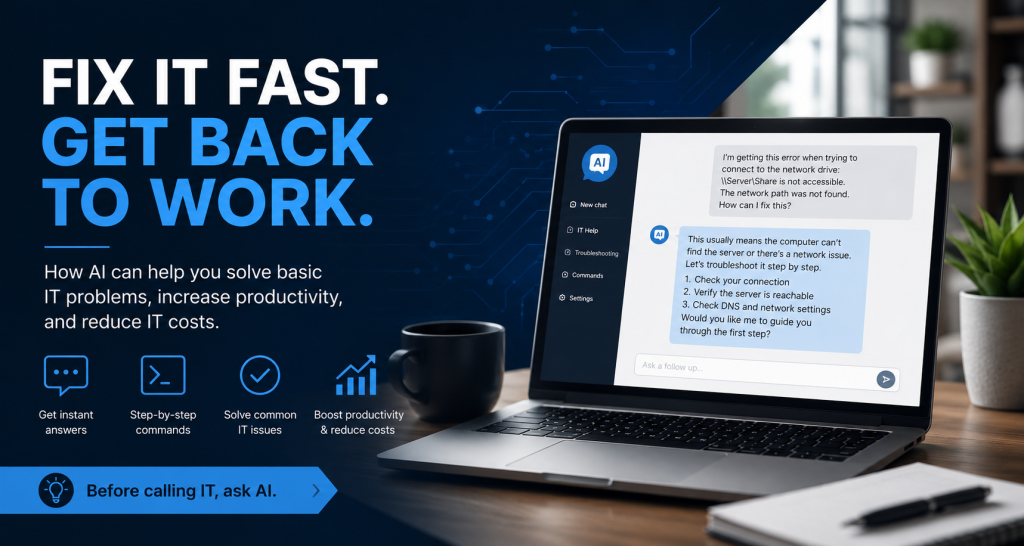
For many businesses, some of the most common IT problems are also the most time-consuming. A printer stops working. An application refuses to launch. A computer cannot connect to a network drive. An employee receives a strange Windows error message. Email stops synchronizing. A website produces an unfamiliar error.
Traditionally, the next step has been to open a support ticket, call an IT consultant, or wait for a technician to investigate. Today, many basic IT problems can be diagnosed—and sometimes completely resolved—by the end user with the help of free artificial intelligence services such as ChatGPT or Google Gemini.
Turn the Error Message Into a Troubleshooting Tool
One of the simplest ways to use AI for technical support is to copy an error message directly into an AI assistant.
Instead of searching through dozens of websites, support forums, and outdated troubleshooting pages, a user can enter something as simple as:
“Windows is giving me this error when I try to connect to the shared drive: [error message]. What does it mean and how do I fix it?”
The AI can explain the error in plain language and provide a series of troubleshooting steps.
The user can then continue the conversation by reporting what happened:
“I tried that command and received this result.”
The AI can use the new information to suggest the next step. Troubleshooting becomes an interactive conversation rather than a frustrating search through technical documentation.
AI Can Provide the Commands
For slightly more technical problems, AI assistants can also provide commands that users can run in Windows Command Prompt, PowerShell, macOS Terminal, or Linux.
For example, an AI assistant might walk a user through checking:
- Network connectivity
- DNS resolution
- IP configuration
- Disk space
- Running services
- File permissions
- Software versions
- Windows updates
- Network routes
- Application logs
Instead of requiring the employee to already know commands such as ipconfig, ping, nslookup, or other diagnostic utilities, the AI can explain exactly what command to run, what the command does, and what information to look for in the results.
The user can paste the output back into the conversation and ask the AI to interpret it.
This creates something that previously did not exist for most employees: an interactive technical troubleshooting assistant available on demand.
Reduce Expensive Break-Fix IT Calls
This can be particularly valuable for small and midsize businesses that rely on outside IT companies.
Many IT providers charge by the hour or have minimum service-call charges. A relatively simple problem can therefore result in a significant bill even when the actual fix takes only a few minutes.
AI does not eliminate the need for professional IT support. Complex networking problems, cybersecurity incidents, server failures, hardware repairs, data recovery, and infrastructure changes should still be handled by qualified technical personnel.
But a large percentage of everyday “break-fix” problems are comparatively simple.
If an employee can resolve a browser problem, reconnect a printer, repair a software configuration, clear a cache, restart a service, or identify a network problem without calling an outside technician, the company can potentially reduce both downtime and support expenses.
Employees Can Get Back to Work Faster
The biggest benefit may not even be the reduction in IT bills. It may be the reduction in lost productivity.
Consider an employee who encounters a problem that prevents them from accessing an application. If the employee has to submit a ticket and wait several hours for someone to respond, those hours can become lost productivity.
With an AI assistant, the employee may be able to begin troubleshooting immediately.
A conversation might look like this:
Employee: “Outlook is connected to the Internet but isn’t downloading new messages. What should I check?”
AI: “First, verify whether Outlook is in Work Offline mode. Then check the connection status. Here are the steps…”
If the first suggestion does not work, the employee can simply continue:
Employee: “It wasn’t in offline mode. What should I check next?”
The troubleshooting process continues until the problem is either resolved or identified as something that requires an IT professional.
Even when AI cannot fix the problem, it can often help gather useful diagnostic information before the technician becomes involved.
Better Information for the IT Department
AI-assisted troubleshooting can also make professional IT support more efficient.
Instead of receiving a ticket that simply says:
“The Internet isn’t working.”
the IT department might receive:
“The computer can ping the local gateway, but DNS lookups are failing. Other computers in the office are working normally.”
That is considerably more useful.
AI can help employees perform preliminary diagnostics and organize the results before escalating the problem. The technician spends less time asking basic questions and can concentrate on solving the underlying issue.
Use AI as the First Level of IT Support
Businesses can begin thinking of AI as an informal Level 1 support resource.
Before opening a support ticket, employees can be encouraged to describe the problem to an AI assistant and try a few safe troubleshooting steps.
A simple internal policy might be:
- Describe the problem to the AI.
- Copy and paste any error messages exactly.
- Tell the AI what operating system or application is being used.
- Ask for safe troubleshooting steps one at a time.
- Paste diagnostic results back into the AI when appropriate.
- If the problem cannot be resolved quickly, escalate it to IT along with the troubleshooting results.
This approach does not replace an organization’s IT department. Instead, it filters out many of the basic problems that do not necessarily require an experienced technician.
There Are Important Limits
Employees should also understand that AI-generated technical advice should not be followed blindly.
Users should be especially cautious when an AI recommends commands that:
- Delete files
- Modify the Windows Registry
- Change security policies
- Disable antivirus or firewall protection
- Modify server configurations
- Change user permissions
- Reformat disks
- Remove software
- Alter production systems
Employees should also avoid pasting passwords, API keys, customer information, confidential company data, or other sensitive information into public AI services.
When a proposed fix could affect security, company data, or shared infrastructure, the issue should be escalated to IT.
A New Model for Everyday Technical Support
Generative AI is changing the economics of basic computer support.
In the past, employees generally had two choices when something went wrong: figure it out themselves through web searches or contact someone in IT.
There is now a third option.
An employee can describe the problem in ordinary language, paste in the exact error message, receive an explanation, run suggested diagnostic commands, report the results, and continue troubleshooting interactively.
For businesses, the impact can be significant.
Fewer unnecessary support calls. Less employee downtime. Lower break-fix IT expenses. Faster problem resolution. And more productive employees.
Professional IT support will remain essential, particularly for infrastructure, security, and complex technical problems. But AI can handle an increasing amount of the basic troubleshooting that consumes both employee time and IT budgets.
For many organizations, the most practical approach may be simple:
Before calling IT, ask AI.